 Composal
GitHub Deployment
Use a ready preview reported to GitHub by your deployment provider.
Contents
Choose this when your deployment provider publishes deployments to GitHub. Verify reads the ready deployment link from GitHub; it does not build your app in this mode.
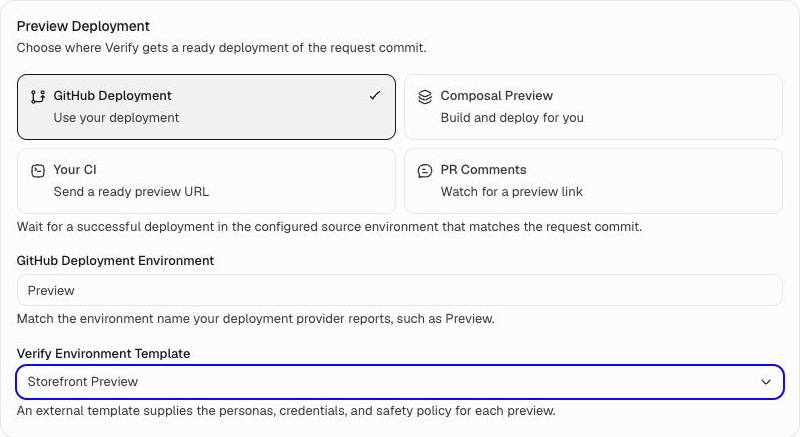
Start on Verify → your project → PR Testing. You need administrator access and a connected GitHub repository. If you have not configured testing yet, follow PR configuration first. The screenshot shows a local example project.
Set it up
- Select GitHub Deployment.
- Enter the GitHub Deployment Environment name. For example, use
Previewif that is what your provider calls its preview deployments. - Choose a Verify Environment Template for the tests.
- Choose Save Settings.
What happens next
Your provider deploys the PR. Verify waits for GitHub to report a successful, non-production deployment of the current PR commit, with a link to the app.
The GitHub App needs permission to read deployments. If the provider only puts the link in a comment, use PR Comments. If the link only exists as a workflow output, use Your CI.
If the preview is not found
Check that GitHub shows a successful preview deployment for the current commit, the environment name matches exactly, and the deployment has an app URL. Confirm that the GitHub App can read deployments.
If no matching preview arrives within one hour, the run is blocked. Fix the setup, then request a new run.
Return to PR configuration to save your settings, try a PR, and configure merge checks.