 Composal
PR Comments
Read preview links from bot comments, detect a rule, and test it before saving.
Contents
Choose this when a deployment bot posts the preview link in a PR comment. This works with new comments and edits to an existing bot comment.
Start on Verify → your project → PR Testing. You need administrator access and a connected GitHub repository. If you have not configured testing yet, follow PR configuration first. The screenshot shows a local example project.
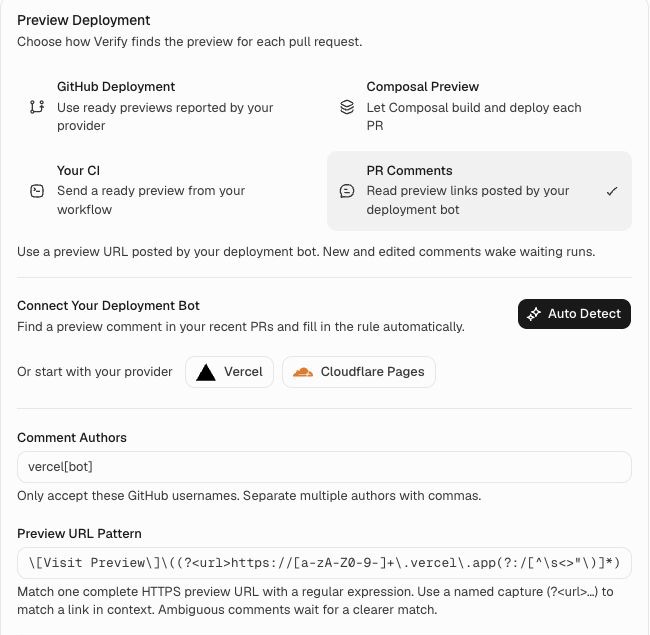
Set it up with Auto Detect
- Select PR Comments.
- Choose Auto Detect.
- Review the suggested author and URL pattern. The result links to the PR comment it used, so you can check that it found the right preview.
- Choose a Verify Environment Template, then Save Settings.
Auto Detect looks through recent open and closed PRs, including drafts. It uses GPT-6 Luna with medium reasoning to find a deployment comment and suggest a reusable rule. It fills the settings for you; it does not change the comments or deploy your app.
The search is limited to recent PRs and a small number of comment pages. If it cannot find a clear preview link, use a preset or enter a rule yourself.
Start with a preset
 Vercel
 Cloudflare Pages
Choose Vercel or Cloudflare Pages to fill the usual bot username and URL pattern. Check the author against a real comment in your repository, choose the environment template, and save.
If the bot posts links for several apps, narrow the pattern to the app you want to test. The Cloudflare Pages preset selects the deployment-specific link rather than the production address or branch alias.
Set your own rule
Comment Authors lists the GitHub users whose links Verify may accept. Use the complete username, including [bot] for a bot. Separate several usernames with commas.
Preview URL Pattern is a rule for recognizing the right link. It uses a regular expression. For example, a pattern for a deployment link might be:
https://[a-f0-9]{8,40}\.storefront\.pages\.dev
Here, the changing part before .storefront.pages.dev identifies a deployment. Replace storefront with your own project name. The rule must select one distinct, complete HTTPS URL. If several different links match, Verify waits rather than choosing one at random.
For comments containing several kinds of links, a named capture can select only the preview:
Preview: (?<url>https://[a-z0-9-]+\.example\.com)
That example expects text such as Preview: https://build-123.example.com. You can leave these details to Auto Detect when it finds a suitable comment.
Test the rule before saving
Use Test Your Rule under the URL pattern. Choose Comment Link to read a real GitHub comment, or Comment Text to paste the original comment text, including its Markdown links. Then choose Test Rule.
To copy a comment link, open the PR's Conversation tab on GitHub. Open the comment's ⋯ menu and choose Copy link. The link should end in #issuecomment- followed by a number, and belong to the repository selected in PR Testing. Links to individual code-review comments are not supported.
The result shows the preview URL when exactly one complete HTTPS link matches. Otherwise it explains what to fix, such as an author mismatch, multiple matching URLs, or an invalid pattern. Linked comments also check the actual GitHub author against Comment Authors. Pasted text checks the URL pattern only, because it cannot verify the author.
Testing uses your current, unsaved rule. It does not save settings or start a run. It also does not check whether the preview is ready or belongs to the current commit; those checks still apply when a live run waits for a preview.
What happens next
When an allowed author posts or updates a matching preview link, Verify checks it and wakes the waiting run. It also checks existing comments while waiting. This supplies a preview to a run; your run triggers still decide when runs start.
A comment must name the current PR commit or have been updated after the run was requested. An older comment without a commit reference waits for a fresh update. Comments that name another commit, contain conflicting commit references, or match several preview links are ignored.
Your deployment bot is responsible for posting a ready link for the correct version. Prefer a URL that belongs to one specific deployment. A generic website does not tell Verify which commit it is serving.
If the preview is not found
Check that the author matches exactly and one preview link matches the pattern. The comment must name the current commit or have been updated after this run was requested.
If no matching preview arrives within one hour, the run is blocked. Fix the setup, then request a new run.
Return to PR configuration to save your settings, try a PR, and configure merge checks.