 Composal
Your CI
Send Verify a ready preview link from your deployment workflow.
Contents
Choose this when your team already has a workflow that builds and deploys the app. CI means that automated workflow, such as GitHub Actions.
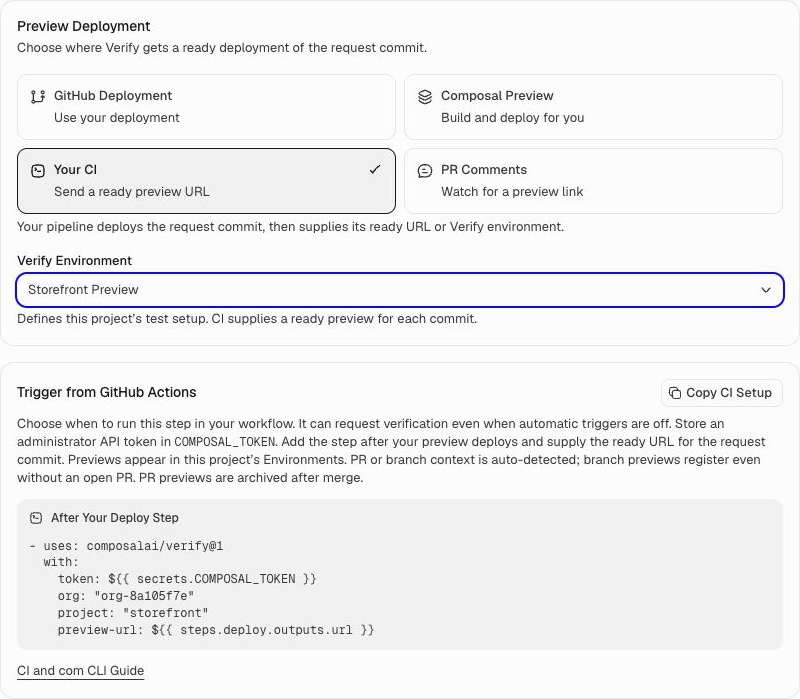
Start on Verify → your project → PR Testing. You need administrator access and a connected GitHub repository. If you have not configured testing yet, follow PR configuration first. The screenshot shows a local example project.
Set it up
- Select Your CI and choose the Verify Environment that defines the test setup.
- Use Copy CI Setup in Trigger from GitHub Actions to copy the project-specific workflow step.
- Add the step after your preview has finished deploying. Supply its ready URL using
preview-url. - Store the administrator API token in the GitHub secret named
COMPOSAL_TOKEN. Keep its value out of your workflow file and logs. - Choose Save Settings, then try the workflow on a PR.
What happens next
Your workflow deploys the app and gives Verify its preview link. Verify tests that preview using this project's saved configuration.
You can also hand over an existing ready Verify environment instead of a URL. For the complete workflow examples, token setup, and supported inputs, see GitHub Actions setup. Use Copy Instructions for Agent if you want a repository agent to help configure the workflow.
The workflow can request verification even when automatic triggers are off. Keep the preview running until the test run and its cleanup finish.
If the preview is not found
Check that the workflow deployed the current PR version and sent its ready URL. Confirm that the Verify step runs after deployment and uses the correct organization, project, and token.
If no matching preview arrives within one hour, the run is blocked. Fix the setup, then request a new run.
Return to PR configuration to save your settings, try a PR, and configure merge checks.